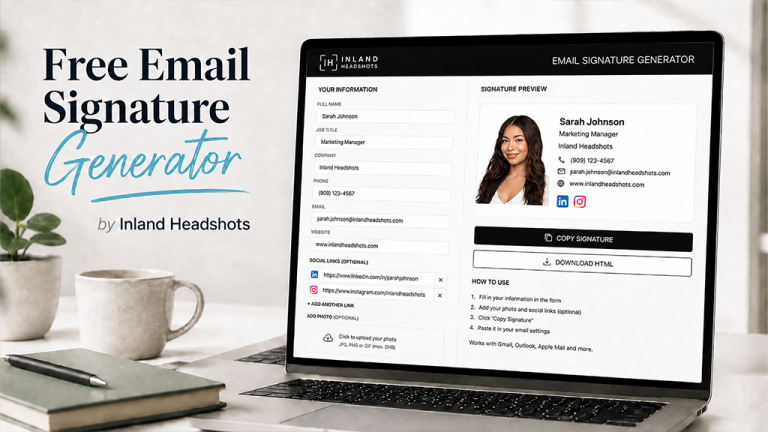
A Free Tool from Inland Headshots With No Strings Attached
A professional email signature is one of those small details that can make your emails look a lot more polished.
The problem is that a lot of email signature generators either charge you, make you create an account, put their branding all over your signature or let you build the whole thing before hitting you with a paywall at the end.
That is not what we wanted to do.
Inland Headshots created a free Email Signature Generator that you can use without paying for anything.
No subscription.
No credit card.
No account required.
No surprise paywall after you finish building your signature.
It is simply a free tool we created for professionals who want an easy way to improve the way they present themselves online.
Create Your Free Email Signature
And if the photo in your current signature is a selfie, an old company photo or something you cropped out of another picture, we can help with that too.
Book a Professional Headshot with Inland Headshots
Why Is Inland Headshots Offering It for Free?
Because professional presentation goes beyond just having a good headshot.
Your LinkedIn profile, resume, website, email signature and headshot all work together to create the way people see you professionally.
At Inland Headshots, we obviously specialize in professional headshots, but we also wanted to create useful tools that help people improve the rest of their professional image.
The Email Signature Generator is one of those tools.
You do not have to book a headshot session to use it.
You do not have to become a client.
You do not have to give us your credit card information.
Use the tool, create your signature and go on with your day.
That is it.
What Can You Add to Your Email Signature?
A good professional email signature does not need to be complicated.
You can include your name, job title, company, phone number, email address, website and professional social media links.
If you have a professional headshot, you can also add your photo to help put a face to your name.
The idea is to give the people you email an easy way to know who you are and how to reach you without making your signature feel cluttered.
Why Your Email Signature Matters
Think about how often email is the first interaction you have with someone.
It could be a recruiter, potential employer, client, vendor, coworker or someone you are networking with.
They may see your email before they ever meet you.
A clean signature makes your communication feel more complete and intentional.
It also gives people quick access to your contact information instead of making them search for it.
Your email signature probably will not be the reason somebody hires you or chooses to work with you.
But it is another small piece of your overall professional image.
And those details add up.
Ready to Clean Up Your Email Signature?
You can build one right now using the Inland Headshots Email Signature Generator. It is completely free and there is nothing to sign up for.
Build Your Free Email Signature
While you are updating your professional image, take a look at the photo you are using too. If it no longer represents how you look or how you want to present yourself professionally, it might be time for a new headshot.
You Do Not Need to Know HTML
One of the reasons we built the tool was to make creating a signature easier.
You should not have to know how to code just to put together a professional email signature.
You also should not have to dig through HTML templates, mess around with complicated formatting or pay a monthly fee for something this simple.
The Inland Headshots Email Signature Generator gives you an easier way to put everything together and create a signature you can actually use.
No coding required.
No Trial Period and No Premium Version You Need to Unlock
When we say free, we mean free.
This is not a seven day trial.
There is not a premium version hiding the features you actually want.
We are not asking you to build your signature and then pay to use it.
The goal of the tool is simply to provide something useful.
If you find Inland Headshots because of it and decide to check out our headshot work, awesome.
If you use the generator, create your signature and never book a photography session with us, that is fine too.
The tool is still free for you to use.
Should You Add a Headshot to Your Email Signature?
You do not have to include a photo, but a professional headshot can make your signature feel more personal.
For people who communicate with clients, patients, customers or coworkers remotely, having a face next to your name can help people remember who they are talking to.
The important part is using a photo that fits the professional look of the rest of your signature.
A random selfie or old cropped photo can make an otherwise polished signature feel less professional.
If you already have a professional headshot, the Email Signature Generator gives you another place to put it to use.
If you do not have one yet, Inland Headshots can create a clean, modern image you can use across your email signature, LinkedIn profile, company website and other professional platforms.
Book Your Professional Headshot
Your Professional Image Is More Than One Photo
A professional headshot is important, but it is only one part of how you present yourself.
Your LinkedIn profile, resume, email signature, website and even the small details in the emails you send all contribute to your professional image.
That is why Inland Headshots is creating free tools that can help with more than just photography.
We want them to actually be useful whether you ever become a photography client or not.
Create Your Email Signature for Free
If your current email signature is outdated, cluttered or just your name at the bottom of an email, give the Inland Headshots Email Signature Generator a try.
It is free to use with no subscription, no credit card and no strings attached.
Build your signature, start using it and make every email you send look a little more professional.
Create Your Free Email Signature
And if you are already cleaning up your professional image, do not forget about the photo people see next to your name.
Inland Headshots creates professional headshots for people throughout the Inland Empire who want something clean, modern and professional without looking fake or overly retouched.
Use it on LinkedIn, your email signature, company website, professional profiles and anywhere else people find you online.